Table variables do get created in the TempDB

DECLARE @MyTab1 TABLE
(
Id uniqueidentifier,
Name varchar(200)
)

INSERT INTO @Mytab1 VALUES (newId(),’Ashish’)
SELECT * FROM @Mytab1
SELECT crdate AS CreatedDate,GetDate() As CurrentDate, Name from tempdb.dbo.sysobjects where name not like ‘sys%’
ORDER BY CrDate DESC

clip_image002

Execute the above query in any database multiple times with some seconds interval and you will see the CreatedDate and the CurrentDate very close to each other in the resultset. “CreatedDate” is the time when that table variable was created in the tempDB database and “CurrentDate” is the datetime when you executed the query. “CurrentDate” will always be greater (just milliseconds) than the “CreatedDate”.  Each time you execute the query, It creates a random name prefixed with a #  and there is no naming conflict and no error. A good article here.

Entity Framework CTP4 – Code First – Map your POCO entities to different table

The problem :-
Following is the code I use and I get an error given below:-

Contact:-
public class Contact
{
public int ContactID { get; set; }
public string FirstName { get; set; }
public string LastName { get; set; }
public string Title { get; set; }
public DateTime AddDate { get; set; }
public DateTime ModifiedDate { get; set; }
}


Context:-
public class AddressBook : DbContext
{
public DbSet<Contact> Contact { get; set; }
}

The main program:-
using (var context = new AddressBook())
  {
   var contact = new Contact
   {
   ContactID = 10000,
   FirstName = "Brian",
   LastName = "Lara",
   ModifiedDate = DateTime.Now,
   AddDate = DateTime.Now,
   Title = "Mr."
   };
   context.Contact.Add(contact);
   int result = context.SaveChanges();
   Console.WriteLine("Result :- " + result.ToString());
  }

And I get the following error on "context.Contact.Add(contact);":-

System.InvalidOperationException: The model backing the ‘AddressBook’ context has changed since the database was created. Either manually delete/update the database, or call Database.SetInitializer with an IDatabaseInitializer instance. For example, the RecreateDatabaseIfModelChanges strategy will automatically delete and recreate the database, and optionally seed it with new data. at System.Data.Entity.Infrastructure.CreateDatabaseOnlyIfNotExists1.InitializeDatabase(TContext context) at System.Data.Entity.Infrastructure.Database.Initialize() at System.Data.Entity.Internal.InternalContext.Initialize() at System.Data.Entity.Internal.InternalContext.GetEntitySetAndBaseTypeForType(Type entityType) at System.Data.Entity.Internal.Linq.EfInternalQuery1.Initialize() at System.Data.Entity.DbSet1.ActOnSet(Action action,EntityState newState, TEntity entity) at System.Data.Entity.DbSet1.Add(TEntity entity) at CodeFirst.Client.Program.Main(String[] args) in E:\Ashish\Research\VS Solutions\EntityFramework\CodeFirstApproach_EF_CTP4\CodeFirst.Client\Program.cs:line 35


Solution :-

The error message says:-
“System.InvalidOperationException: The model backing the ‘AddressBook’ context has changed since the database was created. Either manually delete/update the database, or call Database.SetInitializer with an IDatabaseInitializer instance. For example, the RecreateDatabaseIfModelChanges strategy will automatically delete and recreate the database, and optionally seed it with new data”

so, first look at the Database.SetInitializer() method which you can call in three different ways:-

// 1) This is the default strategy.  It creates the DB only if it doesn't exist
Database.SetInitializer(new CreateDatabaseOnlyIfNotExists<ProductContext>());

// 2) Recreates the DB if the model changes but doesn't insert seed data.
Database.SetInitializer(new RecreateDatabaseIfModelChanges<ProductContext>());

// 3) Strategy for always recreating the DB every time the app is run.
Database.SetInitializer(new AlwaysRecreateDatabase<ProductContext>());

None of the above cases is applicable to us If we have an already existing database with data. However, we still need to call Database.SetInitializer(null) to nullify the default strategy , the first one in the above list – “creates the DB only if it doesn’t exist”. There is a link pointed by Pault which has the following comment by Jeff of EF team:-

Friday, August 06, 2010 11:28 AM by Jeff
@Mark
For those who are seeing this exception:
"The model backing the ‘Production’ context has changed since the database was created. Either manually delete/update the database, or call Database.SetInitializer with an IDatabaseInitializer instance."
Here is what is going on and what to do about it:

When a model is first created, we run a DatabaseInitializer to do things like create the database if it’s not there or add seed data. The default DatabaseInitializer tries to compare the database schema needed to use the model with a hash of the schema stored in an EdmMetadata table that is created with a database (when Code First is the one creating the database). Existing databases won’t have the EdmMetadata table and so won’t have the hash…and the implementation today will throw if that table is missing. We’ll work on changing this behavior before we ship the fial version since it is the default. Until then, existing databases do not generally need any database initializer so it can be turned off for your context type by calling:

Database.SetInitializer<Production>(null);

Jeff

So, I took a leaf out of the above and added that in my main program:-

Database.SetInitializer<AddressBook>(null);
using (var context = new AddressBook())
          {
                   var contact = new Contact
                   {
                       ContactID = 10000,
                       FirstName = "Brian",
                       LastName = "Lara",
                       ModifiedDate = DateTime.Now,
                       AddDate = DateTime.Now,
                       Title = "Mr."
                   };
                   context.Contacts.Add(contact);
                   int result = context.SaveChanges();
                   Console.WriteLine("Result :- " + result.ToString());

               }

After making the above code change, I ran the program and hit a wall again (small part of the error message shown below):-

System.Data.EntityCommandExecutionException: An error occurred while executing the command definition. See the inner exception for details. —> System.Data.SqlClient.SqlException: Invalid object name ‘dbo.Contacts’.   at System.Data.SqlClient.SqlConnection.OnError(SqlException exception, Boolean breakConnection)   at System.Data.SqlClient.SqlInternalConnection.OnError(SqlException exception, Boolean breakConnection)
 

Code-first, by convention, assumes that your table in the database is plularized form of your POCO class. For example, If your POCO class is Contact, code-first assumes that the table name is “Contacts” and tries to find the table named “Contacts” to persist the Contact objects to “Contacts”  table. Thats why we see an error above as we dont have a table named “Contacts” in the database. We have table name as “Contact” instead.

So, while working with existing database, What If you want your POCO class point to a differnt table? For example, your POCO class is Contact however your table in the database is also Contact. The table name could be anything. To fix this, you need to map your Contact entity to the correct table name when the model is being created. In the context class, override the OnModelCreating() event handler in the Context class and map the object to the correct table name.
public class AddressBook : DbContext
    {
        public DbSet<Contact> Contacts { get; set; }

        protected override void OnModelCreating(ModelBuilder modelBuilder)
        {
            modelBuilder.Entity<Contact>().MapSingleType().ToTable("tblContact");
        }
    }

If we run the sample now, It would run without any error. I also discussed this question here.

Entity Framework – Using Select stored procedures for entities having same column names

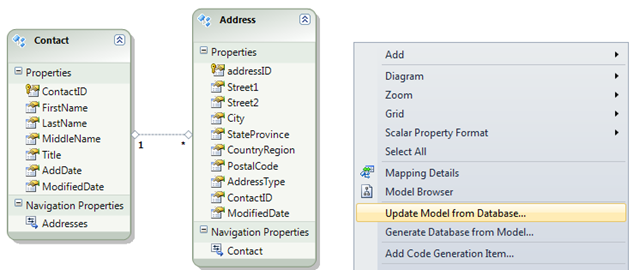
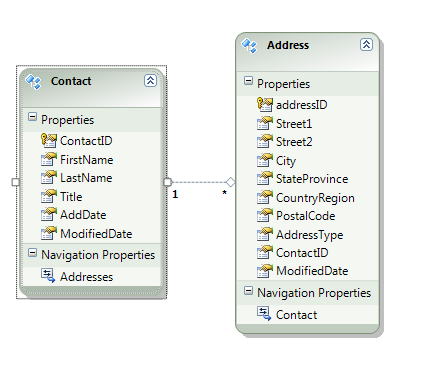
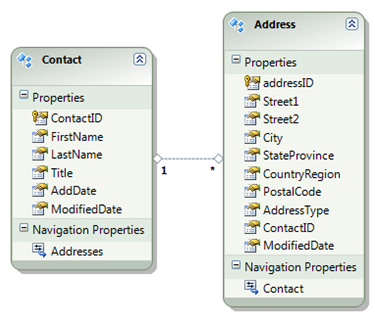
I have this following model. Check the “ModifiedDate” which is common in both the entities.

image

And both tables in the database have ModifiedDate columns. Following is the stored procedure which gets all the contacts along with their addresses:-

CREATE PROCEDURE SelectAllContactsWithAddresses
AS
BEGIN
SELECT Contact.ContactId, Contact.FirstName, Contact.LastName, Contact.ModifiedDate,
Address.AddressId, Address.ContactId AS AddressContactId, Address.CountryRegion,
Address.StateProvince, Address.ModifiedDate
FROM Contact
INNER JOIN Address
ON Contact.ContactId = Address.ContactId
END

Right click on the model and add the new stored procedure to the model :-
image image

Right click on the model and add the stored ptocedure as a “Function Import”.

image

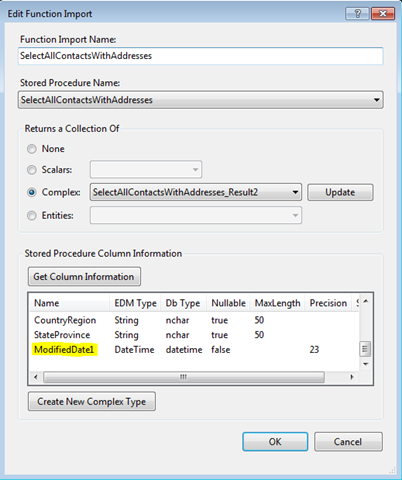
In the “Add Function Import” dialog, enter the function name and select the stored procedure name :-


In the dialog, If you click “Get Column Information”, It looks into the stored procedure you selected and shows the selected columns in the immediately below grid. Notice the “ModifiedDate1” column. Although, we didn’t return any column by that name in the stored procedure, the stored procedure returns an ambigous column name “ModifiedDate” which exists both  in Contact and Address tables.image


image


Make sure you click on “Create New Complex Type” to create a new complex type. The result set will be a complex type because It does not match up wo any of the entities in the model, rather it is made of columns from both Contact and Address tables.


Now the context has a method named SelectAllContactsWithAddresses() and when you execute a code like this,

foreach (var item in context.SelectAllContactsWithAddresses())
{
Console.WriteLine(item.FirstName.Trim() + ” ” + item.LastName.Trim());
Console.WriteLine(item.AddressContactId + ” ” + item.CountryRegion);
}

you get the following error :-

System.Data.EntityCommandExecutionException: The data reader is incompatible with the specified ‘AddressBookModel.SelectAllContactsWithAddresses_Result2’. A member of the type, ‘ModifiedDate1’, does not have a corresponding column in the data reader with the same name.
   at System.Data.Query.InternalTrees.ColumnMapFactory.GetMemberOrdinalFromReader(DbDataReader storeDataReader, EdmMember member, EdmType currentType, Dictionary`2 renameList)   at System.Data.Query.InternalTrees.ColumnMapFactory.GetColumnMapsForType(DbDataReader storeDataReader, EdmType edmType, Dictionary`2 renameList)   at System.Data.Query.InternalTrees.ColumnMapFactory.CreateColumnMapFromReaderAndType(DbDataReader storeDataReader, EdmType edmType, EntitySet entitySet, Dictionary`2 renameList)   at System.Data.Query.InternalTrees.ColumnMapFactory.CreateFunctionImportStruc
turalTypeColumnMap(DbDataReader storeDataReader, FunctionImportMapping mapping,EntitySet entitySet, StructuralType baseStructuralType)
at System.Data.EntityClient.EntityCommandDefinition.FunctionColumnMapGenerator.System.Data.EntityClient.EntityCommandDefinition.IColumnMapGenerator.CreateCol
umnMap(DbDataReader reader)   at System.Data.Objects.ObjectContext.CreateFunctionObjectResult[TElement](EntityCommand entityCommand, EntitySet entitySet, EdmType edmType, MergeOption mergeOption)   at System.Data.Objects.ObjectContext.ExecuteFunction[TElement](String functio
nName, MergeOption mergeOption, ObjectParameter[] parameters)   at System.Data.Objects.ObjectContext.ExecuteFunction[TElement](String functio
nName, ObjectParameter[] parameters)   at AddressBook.AddressBookEntities.SelectAllContactsWithAddresses() in E:\Ashish\Research\VS Solutions\EntityFramework\PresentationDemo\AddressBookConsole\AddressBook\AddressBookModel.Designer.cs:line 148
at AddressBookConsole.Program.ShowContacts() in E:\Ashish\Research\VS Solutions\EntityFramework\PresentationDemo\AddressBookConsole\AddressBookConsole\Progra
m.cs:line 50   at AddressBookConsole.Program.Main(String[] args) in E:\Ashish\Research\VS So
lutions\EntityFramework\PresentationDemo\AddressBookConsole\AddressBookConsole\Program.cs:line 15


To put simply, the columns from the stored procedure must match the properties in the entities in the model. So we modify our stored procedure in the following way:-

ALTER PROCEDURE SelectAllContactsWithAddresses
AS
BEGIN
SELECT Contact.ContactId, Contact.FirstName, Contact.LastName,
Contact.ModifiedDate AS ContactModifiedDate,
Address.AddressId, Address.ContactId AS AddressContactId, Address.CountryRegion,
Address.StateProvince, Address.ModifiedDate AS AddressModifiedDate
    FROM Contact
INNER JOIN Address
ON Contact.ContactId = Address.ContactId
END

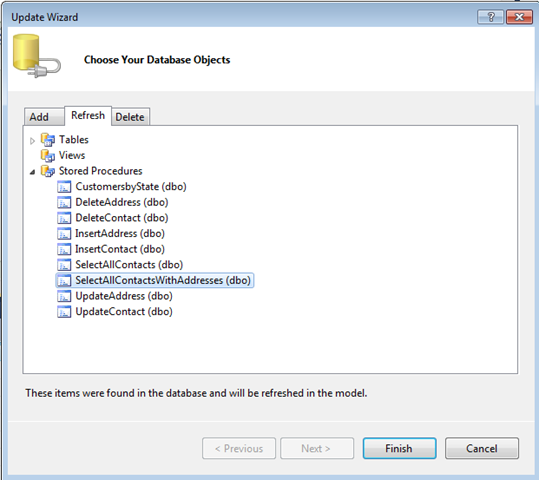
Now we need to “Refresh” the model with the changed stored procedure:-

image

We make sure the function import shows correct columns now. by clicking on the “Get column information” button inthe properties page.
image

We nee to change the properties in the model as well to make it same as the changed columns returned:-
image

Now, we write code like this :-

foreach (var contactWithAddresses in context.SelectAllContactsWithAddresses())
{
Console.WriteLine(contactWithAddresses .FirstName.Trim() + ” ” + contactWithAddresses .LastName.Trim());
Console.WriteLine(contactWithAddresses .ContactModifiedDate + ” ” + contactWithAddresses .AddressModifiedDate);
}

and we get the correct results without any problem:-

image

Entity Framework 4 : POCO support 1 (via ObjectContext)

POCO stands for “Plain Old CLR Objects”. POCO classes are basically classes which we generally write with all the public properties (e.g. Customer, Order).  Now, EF4, by default generates all the entities for us (we will see this in this article) and we dont have to write those classes. Just becuase EF does this, in order to distinguish “OUR” classes or the “Classes written by us” from the generated classes, we call those “OUR” classes as POCO classes.

There are basically 2 ways you can make use of POCO support in EF4:-

A) Via ObjectContext
B) Via T4 Templates  (this will be covered here)


A) Via ObjectContext :-

This is done the following way:-

i) Generate the model using the wizard.
ii) Turn off the code-generation (because you want to write code yourself).
iii) Create your POCO classes, Address and Contact in this case and dont have them inherited from EntityObject.
iv) Create your own ObjectContext class.
v) Use your ObjectContext class to use POCO classes.


i) Generate the model using the wizard:-

Create a console application and follow the below steps:-

Step 1 :-
image

 Step 2 :-
image

Step 3 :-
image

When you click the “Finish” button above, you should see an EDMX file and a code-behind file added to your solution. Double-clicking the edmx file shows the following:-
image

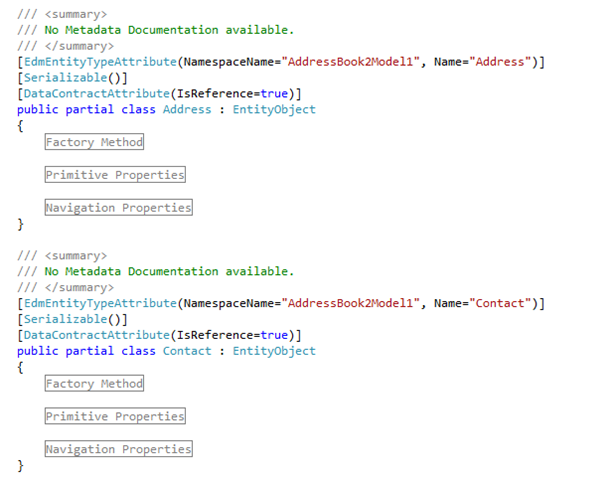
Code-behind file contains the following :-
image

As you see the classes “Contact” and “Address” inherit from EntityObject. there would be times when you dont want your entities to be separated in their own class library and dont want them to get inherited from the EntityObject class. So you (very conventionally) create your own classes named Address and Contacts with the stardard public properties. When objects of those “YOUR” classes are called Plain Old CLR Objects or POCO.

ii) Turn off the code-generation (because you want to write code yourself):-

Select the EDMX file in the solution explorer and go to its property window (press F4). Delete the value for the “Custom Tool” in the properties window.

image image

when you have deleted the custom tool value, notice that the code-behind for the EDMX file is gone and you are on your own to create entities which we will see in the next step.

iii) Create your POCO classes, Address and Contact in this case and dont have them inherited from EntityObject.
Create a class library and create the following classes :-

The Contact class
public class Contact
    {
        public int ContactID { get; set; }
        public string FirstName { get; set; }
        public string LastName { get; set; }
        public string Title { get; set; }
        public DateTime AddDate { get; set; }
        public DateTime ModifiedDate { get; set; }
        public ICollection<Address> Addresses { get; set; }

    }

The Address class
public class Address
    {
        public int addressID { get; set; }
        public string Street1 { get; set; }
        public string Street2 { get; set; }
        public string City { get; set; }
        public string StateProvince { get; set; }
        public string CountryRegion { get; set; }
        public string PostalCode { get; set; }
        public string AddressType { get; set; }
        public DateTime ModifiedDate { get; set; }

        public int ContactID { get; set; }
        public Contact Contact { get; set; }
    }

iv) Create your own ObjectContext class:-

public class POCOObjectContext : ObjectContext
{
       private ObjectSet<Contact> contacts;
       private ObjectSet<Address> addresses;
       public POCOObjectContext()
           : base("name=AddressBook2Entities", "AddressBook2Entities")
       {
           contacts = CreateObjectSet<Contact>();
           addresses = CreateObjectSet<Address>();
       }
       public ObjectSet<Address> Addresses
       {
           get { return addresses; }
       }
       public ObjectSet<Contact> Contacts
       {
           get { return contacts; }
       }

}

Notice the constructer getting used takes two parameters:-

image

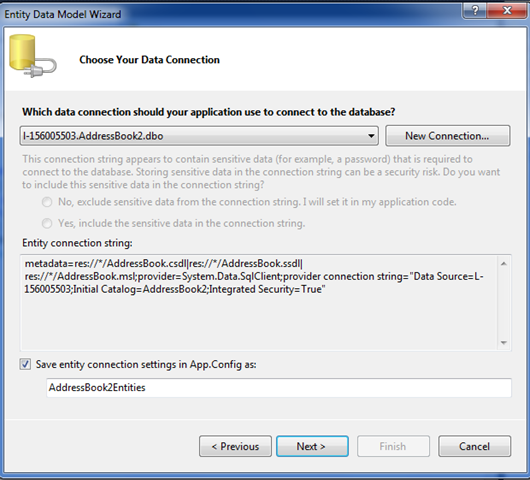
For the first parameter (“name”) we are passing is the name of the connection string in config file. This connection string got added when we generated the model from the database.
For the second parameter, we are passing the name of the container. On the properties window of the edmx file, look for the value for “Entity Container Name”.

image

Using the application :-

Use the classes in the main method of the console application. Below is just printing all the contacts from the “Contact” table.

class Program
    {
        static void Main(string[] args)
        {
            using (POCOObjectContext context = new POCOObjectContext())
            {
                List<Contact> contacts = context.Contacts.ToList();
                foreach (var item in contacts)
                {
                    Console.WriteLine(item.FirstName.Trim() +" "+ item.LastName.Trim());
                }
                Console.ReadLine();
            }
        }
    }

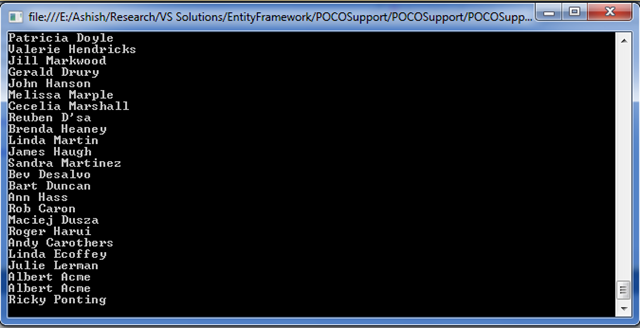
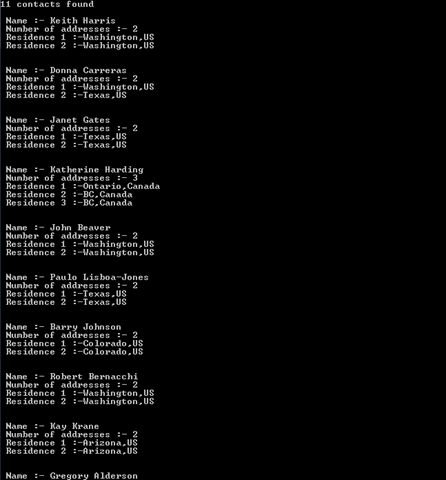
The output:-
image

Summary:-

So, we saw that ObjectContext or your class (inheriting from the ObjectContext) is smart. Although our entity class is not inheriting from the EntityObject, ObjectContext  can look at them and let us work with the them just like we could have with the generated code. The advantage here (with POCOs) is our entities are clean and do not have any dependency on Entity Framework which enables better organized code and gives us flexibility for unit testing etc.

How awesome is System.Threading.Tasks.Parallel class?


The short answer is “profoundly awesome”. This class is introduced in .NET 4.0 and allows you to execute tasks parallelly using threads without you even thinking about thead-way at all.  Recently I worked on a tool which fetches data from database and persists that data as files in the file system. Following is the simplified version of the data in the database tables (Folder and Content)

Folder table :-
image 
Above data suggests that Folder2 is created under Folder1.

Content table :-
image

And the requirement is to persist the content of “MyContent” as MyContent.Html under Folder2/Folder1. This is a simplified example and ofcourse, there were much deeper levels of folders.

Now one way to go about this is :-
a) First create all the folders.
b) Get all contents one by one from the database and persist each of them in the Html file under the corresponding folder.

for the point b) the usual way we would write is something like below :-

  DataSet ContentIdsAndPathsDS = GetAllContentIdsAndPaths();
if (ContentIdsAndPathsDS != null && ContentIdsAndPathsDS.Tables.Count > 0)
{
                   DataRowCollection rows = ContentIdsAndPathsDS.Tables[0].Rows;
                   Stopwatch watch = Stopwatch.StartNew();
                   watch.Start();
                    foreach (DataRow row in ContentIdsAndPathsDS.Tables[0].Rows)
                    {
                      if (row["ContentId"] != DBNull.Value && row["Path"] != DBNull.Value)
                        {
                               string contentId = row["ContentId"].ToString();
                               string fileFullPath = rootFolderPath + row["Path"].ToString() + extensionOfFilesCreated;
                               OutputSingleContent(contentId, fileFullPath);
                         }
                     }
watch.Stop();
                    string message = rows.Count.ToString() + " contents have been written to the disk and It took " + (watch.ElapsedMilliseconds / 1000).ToString() + " seconds";
}

Here is how you would achieve things much faster ( we will see “how much” fast ) using Parallel.ForEach() method.

  DataSet ContentIdsAndPathsDS = GetAllContentIdsAndPaths();
if (ContentIdsAndPathsDS != null && ContentIdsAndPathsDS.Tables.Count > 0)
{
                   DataRowCollection rows = ContentIdsAndPathsDS.Tables[0].Rows;
                   Stopwatch watch = Stopwatch.StartNew();
                   watch.Start();
                   Parallel.ForEach
                       (
                            documentsAndElementsDS.Tables[0].AsEnumerable(), row =>
                            {
                               if (row["ContentId"] != DBNull.Value && row["Path"] != DBNull.Value)
                                {
                                    string contentId = row["ContentId"].ToString();
                                    string fileFullPath = rootFolderPath + row["Path"].ToString() + extensionOfFilesCreated;
                                    OutputSingleContent(contentId, fileFullPath);
                                }
                            }
                        );watch.Stop();
                    string message = rows.Count.ToString() + " contents have been written to the disk and It took " + (watch.ElapsedMilliseconds / 1000).ToString() + " seconds";
}

I highlighted the code in both cases just to indicate that the Parallel.ForEach() executes the same code as our regular ForEach. By the way, following is the method definition which both foreach and Parallel.ForEach() call :-

static void OutputSingleContent(string contentId, string fileFullPath)
       {
           try
           {
               WriteContentToFile(fileFullPath, GetFormattedContent(contentId));
               //WriteContentToFile(logFileFullPath, "File created :- " + fileFullPath, true);
               Console.WriteLine("File created :- " + fileFullPath);
           }
           catch (Exception)
           {
               throw;
           }
       }

The result:-
Following is the result on my Intel(R) Core 2 Duo 2.20 GHz machine:-
image

As you see the Parallel.ForEach is almost 4 times faster than the regular one. The numbers might be diffrent in your machine. However, Parallel.ForEach would still be way faster.

Why it is faster:-
When the program is run, there is only one thread and when you use regular foreach, only that main thread performs the specified operation in each iteration. However, when you use Parallel.ForEach(), a worker thread is used from the threadpool for each iteration and those worker threads would “independently” do the things they have been asked to do.

Debugging parallel programs in VS.NET 2010 is fun. So just for fun, put a berakpoint on the line you have Parallel.ForEach and the start of OutputSingleContent() and debug. It would first hit Parallel.ForEach().

image 
and while you are in debugging mode, open Debug > Windows > Parallel tasks [note that this window is available only when you are in debugging mode]image
You look at your parallel task window and It should show something like this. Note that as the execution is stuck at the Parallel.ForEach() breakpoint At this time, no task has been started in parallel mode.
image 

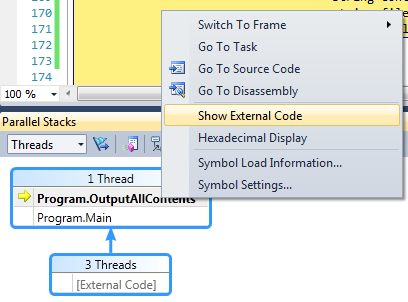
The above parallel stack window indicates that there is only one thread running as of now(the 3 threads are for running internals methods of .NET). If you right click on the main thread box and click on the “Show External Code”, It would show you all those method calls and this is all regular stuff which happens even if you don’t use threads explicitely or Parallel class.
image
But If you step into OutputSingleContent() twise or more, you should see more worker threads under the Parallel stacks window.

image 
Parallel stacks window indicates that there are 2 threads executing OutputSingleContent() method independently.

When do you use this :-
Have a look at the this document which recommends that one should execute  “independent” tasks  with Parallel.ForEach(). In the above example, getting data and saving to a file for each content is an independent operation for each content.

Parallel.ForEach() is just one thing. We can look at msdn to explore more about parallel computing.

Hope this help you in getting started with parallel programming in .NET.

Entity Framework 4.0 : Lazy loading, Eager loading and Explicit loading

Lazy Loading

Lazy loading is not a new concept and I must confess I didn’t know what it is. Thanks to Entity Framework (EF) for having it because It led me to understand lazy loading concept before I know how it can be used in the EF. 🙂

Alright, let us take the following example:-

   1: // member variable
   2: private List<Customer> customers= null;
   3:  
   4: // property
   5: public List<Customer> Customers
   6: {
   7:   get
   8:   {
   9:     if (customers== null)
  10:      customers= GetCustomers();
  11:  
  12:     return customers;
  13:   }
  14: }

Now, anywhere in your program when you use CustomerDataSet, It sees If the customers are already loaded, If not load it (e.g from a data store).

But this is not a new concept, right?  Absolutely! However, the point is this concept is very important when you try to load related objects. Suppose Customers have Orders. You when you get all the customers, do you want to get all the orders placed by them? Probably not. You probably want to get the orders for customers when you need it (you are lazy here) and don’t want to get all the orders for all the customers when you just wanted customers.

Coming back to EF, lazy loading is enabled by default and it is controlled by the following property:-

   1: contextObject.ContextOption.EnableLazyLoading 

where contextObject is an instance of the type of ObjectContext. By default the lazy loading is enabled in EF.

So, how does it work in EF?. I generated the following model from an existing database.

image 
So, as per the above model, a contact can have many addresses. Now, lets try to retrieve contacts having more than one address:-
image
 
Before I ran the above example, I opened the Sql Server profile and started a new trace and then ran the above. Following is the output:-

Capture 
Following is what’s going on in the profiler:-
image
 
Disregard the “Trace Start” in the above and you should notice there are 12 rows. The very first query executed is the following which gets all the contacts in the system and DOES NOT get the addresses associated with all the contacts:-image
The next 11 queries are the for getting the addresses for each of the 11 contacts the very first time we access the Addresses properties for each contact. In this case the query to get all the addresses will be fired when the item.Addresses.Count is called.image 
Following is the Sql query which gets fired to get addresses for each contact. There would be 11 trips to the database with the following query.image

Eager loading:-

What If we want to load all the addresses as well for all the contacts when we get the contacts. Surely It can be done. However, for this, we need to turn off the lazyLoading behavior in EF.  As I said before, It is on by default.

   1: context.ContextOptions.LazyLoadingEnabled = false;

You just need to use “Include” method on the list, in this case the contact’s list and pass the path to other collection for each contact. In this case, each contact has “Addresses” collection, so we pass “Addresses”.

image
 
The output is same:-
 
image
 
Sql Profiler shows a single query getting executed :-
image
And the query is below which gets all the contacts along with their addresses.
image
 image

The query results which show multiple entries for same contact id, because It is listing all the addresses for all the contacts:-

image

Explicit (lazy) Loading:-

You check for the  IsLoaded property of the collection (e.g. Addresses) and if It was not loaded for a given contact, you call the Load() method to load the Addresses for a given contact.

image 
The output is same:-
image

You should see the same number of same queries (same number of database trips) as you saw in case of lazy loading.

image

So the explicit loading is nothing but the lazy loading, however, in explicit loading we explicitly load the child collections (relations) and in lazy loading, we dont have to “load” them, they get loaded when they are accessed.

FaultException() exception thrown by the service is not caught by the client catch(FaultException)

Also posted here:-
Ok, I know I am missing something here. I have the following operation contract:

 
    public double DivideByZero(int x, int y)
    {                  
        if (y == 0)
        {
            throw new FaultException<ArgumentException>
              (new ArgumentException("Just some dummy exception")
              ,new FaultReason("some very bogus reason"), new FaultCode("007"));
        }
        return x / y;
    }
And following is taken from the client:-
      Console.WriteLine("Enter the x value");
      string x = Console.ReadLine();
      Console.WriteLine("Enter the Y value");
      string y = Console.ReadLine();
      try
      {
          double val = client.DivideByZero(Convert.ToInt32(x), Convert.ToInt32(y));
          Console.WriteLine("The result is " + val.ToString());
      }
      catch(FaultException<ArgumentException> exp) 
      {
          Console.WriteLine("An ArgumentException was thrown by the service "+ exp.ToString());   
      }
      catch (Exception exp)
      {
          Console.WriteLine(exp.ToString());
      }
In the above case  catch(FaultException<ArgumentException> exp) (the first catch block with ArgumentException in the client code) block does not get executed. However, when I remove ArgumentException to have catch(FaultException exp), the same catch block gets executed. I am not sure about this as I am throwing FaultException<ArgumentException> from my operation contract. Am I missing anything here.
 
NOTE:-
 If you have a custom exception class and use that to throw and catch, It does work. Not sure why it wont work (serialize) with ArgumentException.

TableDiff.exe in Sql Server 2005

Interestingly, we have a console-based TableDiff.exe in Sql Server 2005 right in our SQL server 2005 installation directory.
 

C:\Program Files\Microsoft SQL Server\90\COM\tablediff.exe
 
From here . Checkout the bulleted point in green:-
 
·         Table Difference tool allows you to discover and reconcile differences between a source and destination table or a view. Tablediff Utility can report differences on schema and data. The most popular feature of tablediff is the fact that it can generate a script that you can run on the destination that will reconcile differences between the tables. TableDiff.exe takes 2 sets of input;
·         Connectivity – Provide source and destination objects and connectivity information.
·         Compare Options – Select one of the compare options
·         Compare schemas: Regular or Strict
·         Compare using Rowcounts, Hashes or Column comparisons
·         Generate difference scripts with I/U/D statements to synchronize destination to the source.
 
 
I haven’t tried this but seems like worth a look..  an example here..

Software engineer and the social service

I have been working as a .NET developer for quite some time now. I always wanted to be a doctor. I thought that is the most nobel profession you can ever have. Because when your loved one is sick, you look up to that doctor after you have prayed to the god. So, if you are a doctor, you have the best opportunity to serve the human kind and the society. Now I could not be a doctor of course :-). Recently I heard Jeffery Ritcher saying that he wanted to write books because he thinks that when he write books/articles, he is helping people. Because he runs into people who say that they got a job when they read his book and they learnt how garbage collector works. So, he feels incredibly awesome that because of his book, somebody got a job and could support family and children and he helped in that. He also comes across some people who say that this software which is running in this hospital, they learnt how to work with virtual memory from his book and they put that in that software and that makes him feel that he is making a massive impact to the society with this little contribution to the hospital helping people’s lives. He says that this is the reason he writes books because he is helping the world to be a better place. What a nobel thought and no doubt why he is a hero many developers like me!

Now we all know that we all  can’t be a Jeffery Ritcher. But It gets to me this thinking that you can serve society this way (or can think some other ways), something which I never thought of. hmmm…