Difference between RPC and Document-Centric/Message Oriented application

With Document/Literal encoding/ Message oriented application, the payload of a message is an XML fragment that can be validated against the corresponding XML schema, for instance:

<?xml version="1.0" encoding="UTF-8"?>
<soap:Envelope
    xmlns:soap="http://schemas.xmlsoap.org/soap/envelope/"
    xmlns:mi="http://www.somedomain.com/xyz/message-id"
    xmlns:proc="http://www.somedomain.com/xyz/processed-by"
    xmlns:po="http://www.books.com/purchase">
    <soap:Header/>
    <soap:Body>
        <po:purchaseOrder orderDate="2008-09-22"
            xmlns:po="http://www.somedomain.com/xyz/PO">
            <po:accountName>Books.com</po:accountName>
            <po:accountNumber>923</po:accountNumber>
            …
            <po:book>
                <po:title>Air Guitars In Action</po:title>
                <po:quantity>300</po:quantity>
                <po:wholesale-price>14.99</po:wholesale-price>
            </po:book>
        </po:purchaseOrder>
    </soap:Body>
</soap:Envelope>

RPC (remote procedure call)/Literal more closely corresponds to remote procedure invocations.
For instance, the method: public float getBookPrice(String inISBN) would correspond to the following RPC/Literal request message:

<?xml version="1.0" encoding="UTF-8"?>
<soap:Envelope
xmlns:soap="http://schemas.xmlsoap.org/soap/envelope/"
xmlns:sd="http://www.somedomain.com/xyz/BookQuote">
   <soap:Body>
      <sd:getBookPrice>
          <isbn>0321146182</isbn>
      </sd:getBookPrice>
   </soap:Body>
</soap:Envelope>

One important difference between RPC and Document web services is that with RPC web services, XML schema will only be created for complex type parameters. It is thus not possible to validate the entire XML fragment contained in the SOAP body.
With Document web services, however, the XML schema needs to define the ENTIRE XML fragment contained in the SOAP body. Consequently, the entire message can be validated against the XML schema.

SQL Server –Error – The FOR XML clause is not allowed in a INSERT statement. – Returning the result of a FOR XML, ELEMENTS in a dynamic query to a variable

Problem :-

When you try to execute a dynamic query having the FOR XML AUTO like this (ignore the query itself for now, you can find the complete script at the end of this article):-

DECLARE @Data2 TABLE(col xml)
DECLARE @Query nvarchar(max)
SELECT @Query= ‘SELECT Customer.CustomerID,Address.FullAddress,Phone.PhoneNumber
FROM #tempCustomer Customer
JOIN #tempAddress Address ON Address.CustomerID= Customer.CustomerID
JOIN #tempPhone Phone ON Phone.CustomerID= Customer.CustomerID
FOR XML AUTO, ELEMENTS

INSERT @Data2 exec (@Query)

You get an error like the following

"The FOR XML clause is not allowed in a INSERT statement.”

From http://msdn.microsoft.com/en-us/library/aa226520(SQL.80).aspx:-

image

The above is applicable for SQL server 2005 as well. Very annoying…

However, if you have something like below, the query would get executed successfully:-

SELECT @Query= ‘SELECT ( SELECT Customer.CustomerID,Address.FullAddress,Phone.PhoneNumber
FROM #tempCustomer Customer
JOIN #tempAddress Address ON Address.CustomerID= Customer.CustomerID
JOIN #tempPhone Phone ON Phone.CustomerID= Customer.CustomerID
FOR XML AUTO, ELEMENTS )


Notice that I prefixed the query with ‘SELECT(‘ and suffixed it with ‘)’. This would allow the query to execute but to return the data in text format rather than XML. However, you can have the result stored in a column of XML data type of a temporary table/variable and It would appear as if the result was XML.

So we need to stuff the prefix and then the suffix in the query. Here is where the STUFF function would come to rescue. It is different from REPLACE function as it allows you to replace a specific instance of a character for a length.

The complete query :- (Just run it)

/* Temporary table to hold sample data. Forgive me for not using the table variable as they would be out of scope when I would use them in the dynamic query*/
if OBJECT_ID(‘tempdb..#tempCustomer’) is not null
BEGIN
DROP TABLE #tempCustomer
END
CREATE TABLE #tempCustomer (CustomerID INT)

if OBJECT_ID(‘tempdb..#tempAddress’) is not null
BEGIN
DROP TABLE #tempAddress
END
CREATE TABLE #tempAddress (CustomerID INT,FullAddress VARCHAR(100))

if OBJECT_ID(‘tempdb..#tempPhone’) is not null
BEGIN
DROP TABLE #tempPhone
END
CREATE TABLE #tempPhone (CustomerID INT,PhoneNumber VARCHAR(100))

/* Insert sample data*/
INSERT #tempCustomer VALUES(1)
INSERT #tempAddress VALUES(1,’Some Address’)
INSERT #tempPhone VALUES(1,’212-111-2222′)
INSERT #tempCustomer VALUES(2)
INSERT #tempAddress VALUES(2,’Other Address’)
INSERT #tempPhone VALUES(2,’212-777-8888′)

/* Build the dynamic query*/
DECLARE @Data2 TABLE(col xml)
DECLARE @Result XML
DECLARE @Query nvarchar(max)
SELECT @Query= ‘SELECT Customer.CustomerID,Address.FullAddress,Phone.PhoneNumber
FROM #tempCustomer Customer
JOIN #tempAddress Address ON Address.CustomerID= Customer.CustomerID
JOIN #tempPhone Phone ON Phone.CustomerID= Customer.CustomerID
FOR XML AUTO, ELEMENTS’

/* There can be many ‘SELECT’ in the query, we need to get the last one as that would be the one
which is having the FOR XML AUTO, ELEMENTS .
So, reverse the string and get the first index of the ‘select’
and then stuff the reverse of ‘SELECT (‘ and ‘)’ and reverse the result again to get the correct
string*/
–PRINT @Query
SELECT @Query=REVERSE(  @Query)
–PRINT @Query
DECLARE @FirstIndexOfSelect INT
SELECT @FirstIndexOfSelect = CHARINDEX(REVERSE(‘SELECT’) , @Query )
–PRINT @FirstIndexOfSelect
SELECT @Query =STUFF(@Query,@FirstIndexOfSelect,6,REVERSE(‘SELECT (SELECT’))
SELECT @Query=REVERSE(@Query)+’)’
–PRINT @Query
INSERT @Data2 exec (@Query)
SELECT @Result =Col FROM @Data2
SELECT @Result

Procrastination

Procrastination – “is a behavior which is characterized by the deferment of actions or tasks to a later time” and its better explained here.
A funny example is in an excellent you tube video her

e.

The problem
—————
I truly believe that procrastinate because of most importantly the lack of focus among many other reasons.
I procrastinate because I think even if I study, I wont get anything and there is no point spending time..there is too much to study. Even if I start I wont be able to study a lot and if I don’t, there is no point studying.

This is how I try to overcome this?
—————————————
– Study short items and not too many items and be aware that you have studied them and take 15 minutes in a day to remind them to yourself.
– Do not think that you have studied less at any point of time.
– Get the gist of the short items and get that as fast as you can.
– Take frequent breaks.
– Do not think of anything while studying irrespective of whatever it is about.
– Think whatever you are doing now is moving you towards your goal and the goal is that short item you are focusing on and studying.


N.B. :- The funny thing is I procrastinated for writing this blog entry itself for 3 days. 🙂 See the point I am making above. 😉

Programmatically showing only the custom styles in the style pane of a Word 2007 file

The project in which I working nowadays is a content authoring and management system and makes extensive use of Word 2007. The system has two parts in context of the problem I am going to discuss about – One part where the Admin uploads a Word 2003 (.doc) file containing all the custom styles created in there into the system. Let us call this file as a word template. The second part is where the user uploads his own content files Word 2003 (.doc) files in the system. When the user uploads the content in the system, the styles from the word template gets into the to the uploaded content file (more on this later). This facilitated the styles being introduced in the system only once (or whenever the Admin wants) using the template and the same styles getting used in all the content files without having the user to recreate them in each content file. This also offered the consistency in the styles used in the content files used in the system.

Problem :- When the user uploads the content and then later opens the content for editing, he was seeing the inbuilt styles as well and they wanted only the custom styles and “Clear Formatting” option to be seen in the content file. Silly , isn’t it. But this is was requirement.:-)

Just to make sure we we are all clear on what an in-built and what a custom style is :-

Open Word 2003 and choose Format > Styles and Formatting and what ever styles you see in the style pane are all in-built styles.

image

And you can create a new style by clicking on  the “New Style” button. I created one “MyCustomStyle”. So this is the custom style in my file.

image

I need to take the attention back to my following line which I mentioned earlier :-

“When the user uploads the content in the system, the styles from the word template gets into the to the uploaded content file (more on this later). “

The way we do this is following :-

1. Convert the template word 2003 file to word 2007 format using a third party component named “Aspose.Words.dll” (www.aspose.com)
2. Convert the content word 2003 file to word 2007 using Aspose.Words.dll.

Just in case you are not aware, a Word 2007 file is an archive/zip file. You can rename any Word file (.docx) to zip file and extracts its contents as if it was a Zip file. When you look into the contents of that zip file, you will see each component of the word 2007 being represented by a file. Read about this here.
3.Copy the custom styles in the style.xml of template file to the style.xml content file.
4. Convert the content word 2007 file back to word 2003 using Aspose.Words.dll.

All the above four steps happen while the user attempts to open the file and when the file was ultimately opened, he sees the inbuilt styles as well along with the custom styles which is the problem.

When I started looking into the problem(an you, dear reader must have realized by now for sure), it seemed that user can always filter the custom styles:-

image

However, this is exactly what the users of the application did not want to do. So the effort of convincing them was in vain.

So, first I started looking at if Aspose.Words.dll offers any API to change the filter to show only the custom styles in the word 2003 file, when we convert the content 2007 file back to 2003. It turns out that It does not and a request for incorporating that change would take months.

I started looking at any other commercial product which would do a better job than Aspose and even the using Office Migration Utility(OFC) and wordconv.exe (comes with the Office compatibility pack). Those did not help either.

So then I looked at if we can find something in the files in the content word 2007 archive itself. There must be something in that archive which is telling Microsoft Word 2007 which types of styles to show in the style pane.

I came across an article at http://msdn.microsoft.com/en-us/library/documentformat.openxml.wordprocessing.stylepaneformatfilter(office.14).aspx

Which states that For this , the w:stylePaneFormatFilter element in the settings.xml of the docx file can have the following values:-
0x1000 –  Specifies that a style should be present which removes all formatting and styles from text.
0x0002 – Specifies that only styles with the customStyle attribute should be displayed in the list of document styles.
So I sum the hex values above to get 1002 to show both Custom Styles and the Clear Formatting.
To test this, I created a new file in Word 2007 and created a new style named “MyCustomStyle” in it.

image

Then I rename that .docx file to .zip and then unzipped the same:-

image renamed to image

and extracted and navigate to Word folder to see the Settings.xml:-

image

Opened that file and see the following structure :-

image

I added the following node right under the root of the xml:-
<w:stylePaneFormatFilter w:val=”1002″/>

image

Updated the zip file and renamed the zip file back to docx and opened the docx file and saw only my custom style and “Clear All”!

image

Accessing user control’s control from the ASPX page‏

Ok, I know, I know! ?This is something you must be wondering like “Why this guy is so scre*** up and he had to blog about this”. But I got into this problem last week and an realized that I have seen this problem and addressed this ..but just forgot about. So why not just blog about this. At least for myself :-). So, forgive me folks!!

Using user control from the ASPX page:-

The goal was to access the user control’s control from the ASPX page. First I started looking into why that control in the user control wont be available in the page load of the ASPX page. I could have debugged it. But I thought enabling tracing in and looking into the traces would be a better idea. So I added the trace switch in the web.config (I could have done this on that page itself, but I just did that in the Web.config.). I use the following tag in the Web.config under <System.Web>:-

<trace enabled=”true” pageOutput=”true”/>

clip_image002

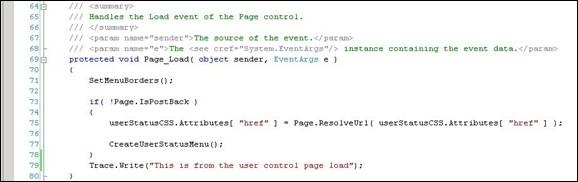
Then I put the some Trace.Write statement in the Page_Load of the user control. Notice this is the method where the menu control is getting created (getting populated with the child control). I put the Trace.Write statement at the end of the Page_Load event handler.

clip_image004

I put the Trace.Write statement in the Page_Load of the ASPX page as well at the end.

clip_image006

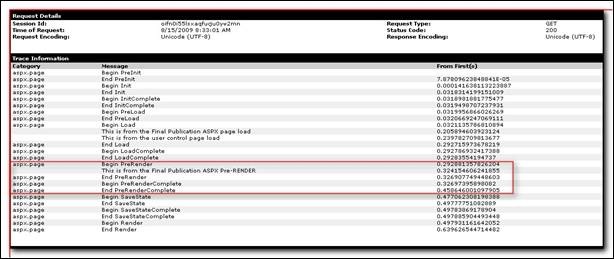
Now, when I try accessing the aspx page, It would give all the tracing information right from “PreInIt” to “Render” along with all the information on the controls on this page.

Notice that the Trace.Write statement from the user control is afterthe same from the ASPX page which implies that the page load of the user control is fired after the page_load of the ASPX page and hence the user control’s control collection wont be available in the aspx page.

clip_image008

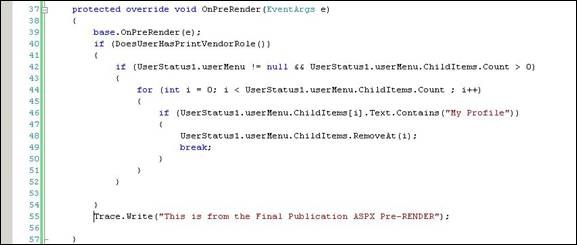
Now, there is another event named Page_PreRenderwhich fires after the page load and you can tweak the controls before thry get Rendered to the page. You can override that event handler as given below.

Notice that in the below screenshot the user control’s(UserStatus1) control(userMenu) is being accessed and is getting modified. To show that this would work, there is a Trace.Write right at the end of the end of this event handler.

clip_image010

See the Trace.Write statement (highlighted) in between the Begin PreRender and End PreRender.

clip_image012

Quickly open a file in VS2005/VS2008

Just in case you know the name of a file and want to open the among many without finding in the solution explorer,check out the following option in the VS.NET.

Just type "> open" followed by first few characters of the file in the "Find" in the toolbar and it would give you all the matching results(irrespective of the location or extensiton). You just hit enter on the file you want to open.


Update  :- And how to go to that Find bar in the VS 2008. Just hit Ctrl+/ and you are there! 🙂Just hit Ctrl+/ and you are there! 🙂


Gazal by Jagjit Singh – Hai Lau Zindagi

This is one of the numerous beautiful gazals from Jagjit Singh. I first heard this in a documentary named “Hello Zindagi” on Doordarshan hosted by Nalini Singh. I loved this song and after some searching I got this.

Lyrics:-
hai lau zindagi…zindagi noor hai
magar isme jalne ka dastoor hai
adhoore se rishton me jalte raho
adhoori si sasson me pal te raho…
magar jiye jaane ka dastoor hai – 2
Hai lau zindagi..
rawayat hai ke zindagi gahana hai
ya heera hai aur chatate rahana hai
Ke lamhon main marne kaa dastoor hai-2
Hai lau zindagi..

Thanks,
Ashish

Nice add-ins for Reflector

Nice add-ins for Reflector:-
 
 
(if you dont have reflector,download the same from http://www.aisto.com/roeder/dotnet).
 
One of the very useful add-in is the "diff" add-in. Which would point out the differences between the two versions of the same assemblies including any added/changed/deleted members/methods.
And also the "File Diassembler" where all you have to do is provide the assembly (with the dependent assemblies) you want to disassemble and it would generate the class library out of the same with all the source code.
Others are code search,Code Metrics and many more.
 
In order to use an add-in in the Reflector :-
a) Copy the all the binaries for the add-in in the same directory as the Reflector.exe.
b) In the reflector,View > Add-In. In the Add-ins dialog,Add the dll for the Add-in.
c) You should see the added "Add-In" under Tools menu.