Unit testing a static method which calls another static method using Moq

Recently I came across code like below in UI (code behind) which basically calls a static method on a repository :-

RandomPage.aspx.cs :-

protected void btnSave_Click(object sender, EventArgs e)
{
          Guid id = Guid.NewId();
          string name = txtName.Text;
          RandomRepository.RandomStaticMethod(id, name);
}

Now let us look at the “RandomStaticMethod()” method in the “RandomRepository”
class. The method just calls couple of another static methods in the “DataAccess” class.
RandomRepository.cs :-

/// <summary>
/// Repository for some random data access
/// </summary>
public class RandomRepository
{
     /// <summary>
     /// Name of the stored procedure to insert data in a table
     /// </summary>
     private const string SomeRandomTableInsertSP = "SomeRandomTable_Insert";

     /// <summary>
     /// The connection string
     /// </summary>
     private const string ConnectionString = "Random connection string";

     #region Static method
     /// <summary>
     /// A random static "Factory" method
     /// </summary>
     /// <param name="id">The value for the Id parameter.</param>
     /// <param name="name">The value for the Name parameter.</param>
     public static void RandomRepositoryMethod(Guid id, string name)
     {
         DataAccess.ExecuteNonQuery(
         ConnectionString,
         SomeRandomTableInsertSP,
         DataAccess.CreateParameter("@Id", SqlDbType.UniqueIdentifier, id),
         DataAccess.CreateParameter("@Name", SqlDbType.NVarChar, name));
     }
    #endregion  
}

DataAccess.cs:-

/// <summary>
/// Classes for the database operations
/// </summary>
public class DataAccess
{
    /// <summary>
    /// Creates the parameter.
    /// </summary>
    /// <param name="name">The name of the parameter.</param>
    /// <param name="type">The type of the parameter.</param>
    /// <param name="value">The value of the parameter.</param>
    /// <returns>The SqlParameter</returns>
    public static SqlParameter CreateParameter(string name, SqlDbType type, object value)
    {
        return new SqlParameter { ParameterName = name, SqlDbType = type, Value = value };
    }

    /// <summary>
    /// Executes the query.
    /// </summary>
    /// <param name="connectionString">The connection string.</param>
    /// <param name="storedProcedure">The stored procedure.</param>
    /// <param name="inParameters">The in parameters.</param>
    public static void ExecuteNonQuery(string connectionString, string storedProcedure, params DbParameter[] inParameters)
    {
        // Do some actual database operations here
    }
}

What do we need to test?
– RandomRepositoryMethod().
We need to test If It could call DataAccess.ExecuteNonQuery() with appropriate number/type/values of parameters.
Why? In this example, I have only two parameters. However, in real world, you might be using a lot more than that. I have seen about 20 parameters being passed and many time have made mistakes by copying pasting the same parameters and getting the error later. If you say you never made that mistake, you must be lying. Smile

Now, read on…

If you look at RandomRepositoryMethod() you see that the RandomRepository class is dependent on the DataAccess class which does the actual database operations. Since this is a unit test for RandomRepositoryMethod() and not for DataAccess and we don’t want to interact with the actual database, we need to “mock” the DataAccess class.

How to mock the DataAccess here?

  1. Add an interface “IDataAccess” which has the dependency methods – CreateParameter and ExecuteNonQuery.
  2. Explicitly implement the IDataAccess methods – CreateParameter() and ExecuteNonQuery() on the DataAccess class.
  3. The explicitly implemented interface methods – CreateParameter() and ExecuteNonQuery() should just call their static counter parts.
  4. Inject the dependency (DataAccess) to the dependent method.
  5. Write the unit test method using Moq.

IDataAccess interface :-

/// <summary>
/// An interface for DataAccess
/// </summary>
public interface IDataAccess
{
    /// <summary>
    /// Creates a SqlParameter with the given name, type, and value.
    /// </summary>
    /// <param name="name">The name of the parameter.</param>
    /// <param name="type">The type of the parameter.</param>
    /// <param name="value">The value of the parameter.</param>
    /// <returns>Returns a SqlParameter created with the given arguments.</returns>
    SqlParameter CreateParameter(string name, SqlDbType type, object value);

    /// <summary>
    /// Executes the given stored procedure.
    /// </summary>
    /// <param name="connectionString">The connection string.</param>
    /// <param name="storedProcedure">The stored procedure.</param>
    /// <param name="inParameters">The parameters to pass into the stored procedure.</param>
    void ExecuteNonQuery(string connectionString, string storedProcedure, params DbParameter[] inParameters);
}

Explicitly implementing the interface
Explicitly implemented methods are in line 35 and 47 which just call their static counterparts.

/// <summary>
/// Classes for the database operations
/// </summary>
public class DataAccess : IDataAccess
{
    /// <summary>
    /// Creates the parameter.
    /// </summary>
    /// <param name="name">The name of the parameter.</param>
    /// <param name="type">The type of the parameter.</param>
    /// <param name="value">The value of the parameter.</param>
    /// <returns>The SqlParameter</returns>
    public static SqlParameter CreateParameter(string name, SqlDbType type, object value)
    {
        return new SqlParameter { ParameterName = name, SqlDbType = type, Value = value };
    }

    /// <summary>
    /// Executes the query.
    /// </summary>
    /// <param name="connectionString">The connection string.</param>
    /// <param name="storedProcedure">The stored procedure.</param>
    /// <param name="inParameters">The in parameters.</param>
    public static void ExecuteNonQuery(string connectionString, string storedProcedure, params DbParameter[] inParameters)
    {
        // Do some database operation here
    }
  
    /// <summary>
    /// Calls the static ExecuteNonQuery() method
    /// </summary>
    /// <param name="connectionString">The connection string.</param>
    /// <param name="storedProcedure">The stored procedure.</param>
    /// <param name="inParameters">The in parameters.</param>
    void IDataAccess.ExecuteNonQuery(string connectionString, string storedProcedure, params DbParameter[] inParameters)
    {
        DataAccess.ExecuteNonQuery(connectionString, storedProcedure, inParameters);
    }
    
    /// <summary>
    /// Calls the static CreateParameter() method
    /// </summary>
    /// <param name="name">The name of the parameter.</param>
    /// <param name="type">The type of the parameter.</param>
    /// <param name="value">The value of the parameter.</param>
    /// <returns>The SqlParameter</returns>
    SqlParameter IDataAccess.CreateParameter(string name, SqlDbType type, object value)
    {
        return DataAccess.CreateParameter(name, type, value);
    }
}   

Inject the dependency in the dependent method (Method injection)
Modify the dependent method to accept a parameter of type IDataAccess. You need to pass an instance of DataAccess from your UI code too.

/// <summary>
/// A random static "Factory" method
/// </summary>
/// <param name="id">The value for the Id parameter.</param>
/// <param name="name">The value for the Name parameter.</param>
/// <param name="dataAccess">The data access.</param>
public static void RandomRepositoryMethod(Guid id, string name, IDataAccess dataAccess)
{
    dataAccess.ExecuteNonQuery(
        ConnectionString,
        SomeRandomTableInsertSP,
        DataAccess.CreateParameter("@Id", SqlDbType.UniqueIdentifier, id),
        DataAccess.CreateParameter("@Name", SqlDbType.NVarChar, name));
}

Write the unit test method :-

/// <summary>
///A test for RandomRepositoryMethod
///</summary>
[TestMethod()]
public void RandomRepositoryMethodTest()
{
	Guid idValue = new Guid("73592249-AD57-4CDF-B5FC-9C30F65C2376");
	string nameValue = "test";
	var dataAccess = new Mock<IDataAccess>();
	IDataAccess actualDataAccess = new DataAccess();
	dataAccess.Setup(a => a.CreateParameter(It.IsAny<string>(), It.IsAny<SqlDbType>(), It.IsAny<object>()))
		.Returns<string, SqlDbType, object>((name, type, value) => actualDataAccess.CreateParameter(name, type, value));

	RandomRepository.RandomRepositoryMethod(idValue, nameValue, dataAccess.Object);
	dataAccess.Verify(
		d => d.ExecuteNonQuery(It.IsAny<string>(), "SomeRandomTable_Insert", new DbParameter[]{
			It.Is<SqlParameter>(p=>p.ParameterName == "@Id" && p.SqlDbType == SqlDbType.UniqueIdentifier && (Guid)p.Value == idValue),
			It.Is<SqlParameter>(p=>p.ParameterName == "@Name" && p.SqlDbType == SqlDbType.NVarChar && (string)p.Value == nameValue)}
			), Times.Once());
}

Lines 07 and 08 set up the value for the “Id” and “Name” parameters.

Line 09 creates a mock of the IDataAccess interface.

Line 10 creates an instance of real DataAccess class.
Why do we need an instance of DataAccess class? – Because, the ExecuteNonQuery() calls CreateParameter() to return an instance of SqlParameter. We need to set that up to return a SqlParameter If we call CreateParameter() with “any” string parameter, “any” SqlDbType and “any” object value. That’s what line 11 and 12 (they are actually one statement) are doing.

Line 14 – Calls the static method.

Lines 15 – 19 (all lines are actually one statement)
Verifies that dataAccess.ExecuteNonQuery was called with “any” string (any connection string), the required stored procedure (“SomeRandomTable_Insert”) and
two SqlParameters – first having parameter name “@Id”, type SqlDbType.UniqueIdentifier and of value “73592249-AD57-4CDF-B5FC-C30F65C2376” AND second having parameter name “@Name”, type SqlDbType.NVarChar and of value “test”. It also verifies that the DataAccess.ExecuteNonQuery() was called exactly one time.

That’s it – you have unit tested your static method. There is one caveat – you need to pass the DataAccess object to each method you want to test (Method Injection). You couldn’t pass the dataAccess object to the class’s constructor because then that instance of dataAccess can not be accessed in the static method. It won’t compile.

public class RandomRepository
{
	/// <summary>
	/// DataAccess object
	/// </summary>
	IDataAccess dataAccess = null;

	/// <summary>
	/// Initializes a new instance of the <see cref="RandomRepository" /> class.
	/// </summary>
	/// <param name="dataAccess">The data access.</param>
	public RandomRepository(IDataAccess dataAccess)
	{
		this.dataAccess = dataAccess;
	}

	/// <summary>
	/// A random static "Factory" method
	/// </summary>
	/// <param name="id">The value for the Id parameter.</param>
	/// <param name="name">The value for the Name parameter.</param>
	public static void RandomRepositoryMethod(Guid id, string name)
	{
	    // Won't compile - "An object reference is required to access non-static member"
		dataAccess.ExecuteNonQuery(
			ConnectionString,
			SomeRandomTableInsertSP,
			DataAccess.CreateParameter("@Id", SqlDbType.UniqueIdentifier, id),
			DataAccess.CreateParameter("@Name", SqlDbType.NVarChar, name));
	}
}

Personally, I didn’t like the ExecuteNonQuery() and CreateParameter() being static. Sure, static methods have their own advantages. My personal preference is to limit them in the utility classes because I find them difficult (read “less easy”) to unit test. I just wanted to mention that performance difference between static method and instance method is negligible.
From http://msdn.microsoft.com/en-us/library/79b3xss3.aspx

A call to a static method generates a call instruction in Microsoft intermediate language (MSIL), whereas a call to an instance method generates a callvirt instruction, which also checks for a null object references. However, most of the time the performance difference between the two is not significant.

Generate random password

A simple way to generate the password

static string GenerateRandomPassword(int numberOfCharactersInPassword)
{
   if (numberOfCharactersInPassword > 32)
   {
	   throw new ArgumentException("A password of length more than 32 can't be generated");
   }
   string guidWithoutDashes = Guid.NewGuid().ToString("n");
   Console.WriteLine("Guid without dashes :- "+ guidWithoutDashes);
   var chars = new char[numberOfCharactersInPassword];
   var random = new Random();
   for (int i = 0; i < chars.Length; i++)
   {
	   chars[i] = guidWithoutDashes[random.Next(guidWithoutDashes.Length)];
   }
   Console.WriteLine("Random password :- " + new string(chars));
   return new string(chars);
}

Dependency Injection

Sample code can be downloaded from here.

First – What is a dependency?
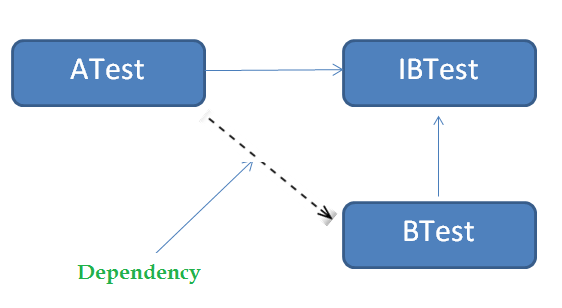
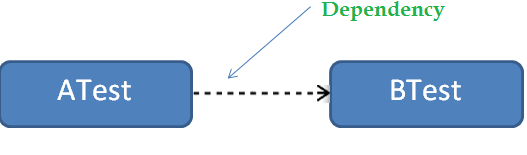
– We are talking about a class (say “ATest”) which needs another class (say “BTest”) to call Its (“ATest”) methods (See below example). Therefore, class “BTest” is a dependency for class “ATest”.

public class BTest
{
     public int DoBTestWork()
     {
           // Do some work
     }
}

public class ATest
{
        private readonly BTest bTest;  // Dependency
        public ATest() 
        {
            bTest = new BTest();
        }
        public void DoATestWork()
        {
            var  bTestOutput = bTest.DoBTestWork();
            // Do something with bTestOutput
        }      
}

image


Can we try decoupling class ATest and BTest.
Yes – try interfaces. Here in the below example. We have the same classes as above. However – this time we have the method in BTest coming from the interface IBTest. Class ATest is now have the object reference of interface IBTest instead of BTest class.

public interface IBTest
{
     int DoBTestWork()
}
public class BTest : IBTest
{
    public int DoBTestWork()
   {
   // Do some work
   }
}

public class ATest
{
    private readonly IBTest bTest;
    void ATest()
    {
      bTest = new BTest();
   }

   public void DoATestWork()
   {
      var bTestOutput = bTest.DoBTestWork();
     // Do something with bTestOutput
    } 
}

Is this good enough? No. Because we we still have the reference of BTest in the ATest class. See – the even though the object bTest is of type IBTest, It is getting instantiated from BTest. So the classes – ATest and BTest are still not decoupled.

image

What is Dependency injection?
– It’s a type of IoC which let us take out the dependencies of a class and handles their (dependencies) creation and binding. This way the class no longer has to have the references of the dependencies.

How to we implement it :-

  • Constructor Injection
  • Property/Setter Injection
  • Method Injection

Constructor Injection
Pass dependency into the dependent class via the constructor. Here, the constructor on ATest is taking an interface of IBTest and we don’t have any reference of the concrete class BTest.

public interface IBTest
{
        int DoBTestWork()
}

public class BTest : IBTest
{
          public int DoBTestWork()
          {
             // Do some work
          }
}

public class ATest
{
         private readonly IBTest bTest;
         void ATest (IBTest bTest)
         {
           this.bTest = bTest;
          }

          public void DoATestWork()
          {
            var bTestOutput = bTest.DoBTestWork();
            // Do something with bTestOutput
          } 
}

Following is the code which would call use ATest and pass the its dependency BTest in it.

IBTest bTest = new BTest();
ATest aTest = new ATest(bTest);
aTest.DoATestWork();

Property/Setter Injection
Don’t pass dependency in the constructor of the dependent class. Just have the interface dependency types as public properties in the dependent class.

public interface IBTest
{
       int DoBTestWork()
}

public class BTest : IBTest
{
       public int DoBTestWork()
      {
       // Do some work
      }
}

public class ATest
{
       public IBTest BTestObject { get; set; }
       public void DoATestWork()
       {
         var bTestOutput = BTestObject.DoBTestWork();
        // Do something with bTestOutput
        } 
}

Following is the code which would call use ATest. It just sets the the public property of dependency interface type (IBTest) to the concrete type(BTest).

IBTest bTest = new BTest();
ATest aTest = new ATest();
aTest.BTestObject = bTest;
aTest.DoATestWork();

We should use this have some optional properties and having those properties not assigned won’t impact calling methods.

Method Injection
Don’t pass dependencies in the constructor or set them on the properties of the dependent class. Just pass them in the method of the dependent class.

public interface IBTest
{
   int DoBTestWork()
}

public class BTest : IBTest
{
     public int DoBTestWork()
     {
        // Do some work
     }
}

public class ATest
{
       public void DoATestWork(IBTest bTest)
       {
          var bTestOutput = bTest.DoBTestWork();
         // Do something with bTestOutput
       } 
}

Following is the code which would call use ATest. It just passes the dependency interface type (IBTest) to the dependent ATest method DoATestWork.

ATest aTest = new aTest();
IBTest bTest = new BTest();
aTest.DoATestWork(bTest);

Inversion of Control (IoC)

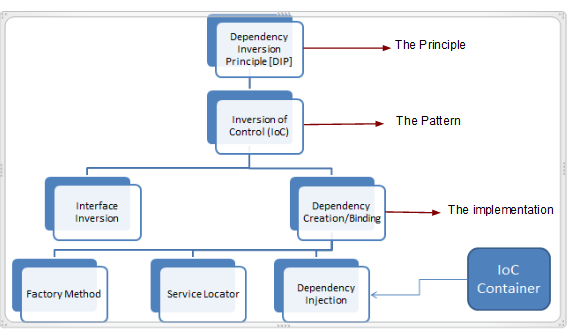
image

  • Dependency Inversion Principle (DIP) – Principle of inverting dependencies in software architecture.
  • Inversion Of Control (IoC) – Pattern which uses DIP.
  • Dependency Injection (DI) – An Implementation of IoC (but there are many other ways to implement IoC).
  • IoC Container – Framework to implement IoC.

Dependency Inversion Principle :-
The higher level modules define interfaces which lower level modules implement. This needs to be done instead of higher level modules depending and using the interfaces which lower level modules expose.

Example :- The computer is a high level device/module. It has an USB port – the interface exposed – to which all other (low level modules) devices e.g iPhone, mouse, Keyboard can plug into. The computer can make use of any device as long as that device can connect to the USB port.

Inversion of Control :-
Provide ways to implement DIP.

  • Interface Inversion
  • Dependency Creation/Binding Inversion
        • Factory methods
        • Service Locator
        • Dependency Injection

Interface Inversion :-
Suppose we have following classes :-
ATest, BTest1, BTest2, BTest3

BTest1, BTest2 and BTest3 do similar BTest type of work which they have implemented with DoB1Work(), DoB2Work() and DoB3Work() respectively.
Now class ATest needs to call public methods (interface) of BTest1, BTest2 and BTest3 separately. Here Class “ATest” is the consumer and all those B classes are providers.

public class ATest
{
    public void DoSomeAWork()
    {
         BTest1 b = new BTest1();
         b.DoSomeBWork();
         // Do something else
    }
}
public class BTest1
{
     public void DoSomeBWork()
     {
          // Do something          
     }
}

So here, the consumer (ATest) needs to know about each provider (BTest1, BTest2 and BTest3). The “control” here is in providers’ (B classes) hand because they are defining interfaces (public methods) which the consumer needs to call and need to be changed If the public method changes.

What should really happen – We create an interface IBTest having one method DoBWork() which would be implemented by all the B classes with their own concrete implementation. Here we inverted the control. The control is in consumer’s (Class A) hands now.

Now we end up having something like below in Class ATest.

IBTest bTest = new B1Test();

Now with above, we are still instantiating a concrete class (B1Test) and this makes the ATest (Consumer) dependent on class B1Test (Provider).

Dependency Creation/Binding Inversion patterns
These patterns let creation of dependencies to be done by another class. Following are the ways to do it.

a) Factory Pattern
b) Service Locator
c) Dependency Injection

Using Tracepoints in Visual Studio

Tracepoints in Visual Studio is a less known feature which really could save lot of our time in debugging .NET applications.

Let us just get straight into it.

Consider the following simplest loop (and simultaneously think about the most complex loop you have ever written). The intention here to determine the value of i and j at the end of each iteration of the for loop on the debug time. There is a breakpoint on the line 23:-

clip_image002

Now right click on the red dot and choose “When Hit”:-

clip_image002[5]

[In VS.NET 2008,you can insert a tracepoint by right clicking on a line and choose Breakpoint > Insert Tracepoint]

And you should be presented with the following dialog:-

clip_image004

Check the checkbox “Print a message” and that would enable the textbox immediately below it. Notice that the “Continue Execution” checkbox gets checked too. Leave that as it is. You can place whatever debugging code to print the values of the in-scope variables on run time. For this example, we put the following:-

clip_image006

Notice the i and j in curly braces and that’s how the variables are represented here. You can place any in-scope variable on that line. That could be a value type variable like i and j or any of your in-scope class’s property or any in-scope FCL object’s property (e.g.XmlDocument.InnerXML).

When you click “OK”, the breakpoint red dot symbol changes to a diamond shaped one and that’s our tracepoint.

clip_image008

Before you do anything, just make sure you have the output window visible [Choose the menu View > Output OR Ctrl+W,O] and start the project with debugging.

You should see the following in your output window. If you see, we could print the values for the entire execution without changing the program.

clip_image010

Tracepoints behave just like breakpoints so we can take the liberty of calling them an extension of breakpoints.You can disable them, delete them, build the solution in the release mode when you don’t want them just like breakpoints.

If you are still not convinced, think of the following:-

a) If you would have added a “watch” for i and j, you could see the value of i and j, however, that would have only been the current value not their values for the entire execution.Tracepoints do exactly what watches don’t do for you.

b) If you could have put the Debug.WriteLine() statement, to print the variable values, you have this maintenance of removing them and I am talking about those large sized projects you are working/worked on.

c) If you could just have a breakpoint placed over and you wanted to do F5 (never mind million number of times) and you have this nested loop, you always wander around the code placing the cursor on the variables on the outer loop to see its value [because you forgot to place a watch on that J]. Then you forget what was the value of the variable in the previous iteration of the for loop, so you either start the execution again or change its value in the immediate window and so on. I have seen this many times and have done that too and I think it wastes some real good proportion of our time which rather should get utilized in better portion of coding.

Conclusion:-
While the breakpoints and watches etc. have still their place, Tracepoints help us quickly tracing and evaluating our program and are good to add in our debugging armory.

Understanding and detecting deadlocks in Sql Server

In order to understand deadlocks, let us first create tables and have some sample data.

/* Tables and data  - Start */
IF OBJECT_ID('Order') IS NOT NULL
BEGIN
DROP TABLE [Order]
END

IF OBJECT_ID('Customer') IS NOT NULL
BEGIN
DROP TABLE Customer
END

CREATE TABLE Customer
(
ID int IDENTITY(1,1) CONSTRAINT PK_cid PRIMARY KEY ,
Name varchar(20)
)

CREATE TABLE [Order]
(
ID int IDENTITY(1,1) CONSTRAINT PK_oid PRIMARY KEY ,
CustomerId int,
OrderDate datetime
)

ALTER TABLE [Order]
ADD FOREIGN KEY (CustomerID)
REFERENCES Customer(ID)

INSERT INTO Customer (Name)
SELECT 'xxx'
UNION ALL
SELECT 'yyy'
UNION ALL
SELECT 'zzz'

INSERT INTO [Order] (CustomerID, OrderDate)
SELECT 1, GetDate()
UNION ALL
SELECT 2, GetDate()
UNION ALL
SELECT 3, GetDate()
/* Tables and data  - End*/

Open Sql Profiler and use the “TSQL_Locks” template.

image

In the “Event selection” tab, make sure you have “Deadlock Graph” selected and the click “Run”.

image

In SSMS, open two new query windows and execute the below batches in those two separate windows at the same time (Hit F5 in one window, switch to the another and hit F5).

Batch 1

/*Transaction A updates record A in table A - Waits and then updates record B in table B*/
BEGIN TRANSACTION
UPDATE Customer SET Name = 'aaa' WHERE ID=1
WAITFOR DELAY '00:00:10' -- Waiting for 10 secs
UPDATE [Order] SET CustomerId = 1 WHERE ID = 2
COMMIT TRANSACTION

Batch 2

/*Transaction B updates record B in table B - Waits and then updates the updates record A in table A */
-- This causes deadlock
BEGIN TRANSACTION
UPDATE [Order] SET OrderDate = GetDate() WHERE Id = 2
WAITFOR DELAY '00:00:10' -- Waiting for 10 secs
UPDATE Customer SET Name = 'bbb' WHERE Id=1
COMMIT TRANSACTION

You will notice that the batch 1 transaction took affect but because batch 2 couldn’t as that was identified as deadlock victim.

image

Look at the profiler now.

image

Notice that the Batch 2 didn’t get committed (See the big blue cross on the left circle and the tool tip on it in the above screenshot from the profiler?). However the Batch 1 did go through and took effect (see below).

image

Note that If the above batches (separate transactions) were updating two different records at the same time, there wont be any deadlocks.

/* Transaction A updates record A in table A waits and the updates record B in table B*/
BEGIN TRANSACTION
UPDATE Customer SET Name = 'aaa' WHERE ID=2
PRINT 'Customer updated...'
WAITFOR DELAY '00:00:10' -- Waiting for 10 secs
UPDATE [Order] SET CustomerId = 1 WHERE ID = 2
PRINT 'Order updated...'
COMMIT TRANSACTION

/*  Should be executed on a separate query window
Transaction B updates record C in table A waits and the updates record C in table B */
BEGIN TRANSACTION
UPDATE [Order] SET OrderDate = GetDate() WHERE Id = 3
PRINT 'Order updated'
WAITFOR DELAY '00:00:10' -- Waiting for 5 secs
UPDATE Customer SET Name = 'bbb' WHERE Id=3
PRINT 'Customer updated'
COMMIT TRANSACTION

image

A simple way to generate random password

I took que from Ambuj’s post to generate a simple password which is more random. It simply takes random specified number of characters from a guid value. Following is the code.

static string GenerateRandomPassword(int numberOfCharactersInPassword)
{
           if (numberOfCharactersInPassword <= 0 || numberOfCharactersInPassword > 32)
           {
               throw new ArgumentException(“A password of only length 1 to 32 can be generated.”);
           }
           string guidWithoutDashes = Guid.NewGuid().ToString(“n”);
           //Console.WriteLine(“Guid without dashes :- ” + guidWithoutDashes);
           var chars = new char[numberOfCharactersInPassword];
           var random = new Random();
           for (int i = 0; i < chars.Length; i++)
           {
               chars[i] = guidWithoutDashes[random.Next(guidWithoutDashes.Length)];
           }
           //Console.WriteLine(“Random password :- ” + new string(chars));
           return new string(chars);
}

The complete project to test quickly can be downloaded from here.

Productivity notes

Notes and slides from Scot Hanselman’s talk on productivity :-

Notes:-

Effectiveness
Rule of three [http://gettingresults.com]-

Write down three outcomes
— of the day
— of the week
— of the month
— of the year

Email
— Create rule to move emails CCed to me to a different label
— Check email on schedule time
— five.sentenc.es

Psychic Weight
Get over it

Efficiency
The pomodoro technique – Download Pomodairo
        Try to do one thing AND only one thing for 25 minutes
        Try to track the interupptions
               — Internal (Tweet, Stackoverflow, Personal email)
               — External (People)
DO NOT MULTI TASK
Do not pile up books/articles at your desk – you are not going them all.
Do not check up on news/sports.
Install RescueTime to measure when you are most productive and when you are not
Look at instapaper.com

Productive websites
boingboing.net
lifehacker.com

Slides :-

Error Install-Package : Conflict occurred. ‘jQuery 1.5.1’ referenced but requested ‘jQuery 1.6.4’. ‘jQuery.vsdoc 1.5.1, jQuery.Validation 1.8. 0, jQuery.UI.Combined 1.8.11’ depend on ‘jQuery 1.5.1’

I was trying to install SignalR using NuGet package manager :-

install-package signalr

and get the following error :-

Install-Package : Conflict occurred. ‘jQuery 1.5.1’ referenced but requested ‘jQuery 1.6.4’. ‘jQuery.vsdoc 1.5.1, jQuery.Validation 1.8.
0, jQuery.UI.Combined 1.8.11′ depend on ‘jQuery 1.5.1’.
At line:1 char:16
+ install-package <<<<  signalr
    + CategoryInfo          : NotSpecified: (:) [Install-Package], InvalidOperationException
    + FullyQualifiedErrorId : NuGetCmdletUnhandledException,NuGet.PowerShell.Commands.InstallPackageCommand

So, It looked like jQuery 1.5.1 was referenced in my app. So, I looked that up and It was found in the package.config.

Capture1

All I had to do is to remove all the jQuery references (highlighed above) and retry installing SignalR again and It got installed successfully this time.

PM> install-package signalr
‘SignalR 0.3.5’ already installed.
Successfully added ‘Microsoft.Web.Infrastructure 1.0.0.0’ to UsingSignalRWithMVC.
Successfully added ‘SignalR.Server 0.3.5’ to UsingSignalRWithMVC.
Successfully added ‘jQuery 1.6.4’ to UsingSignalRWithMVC.
Successfully added ‘SignalR.Js 0.3.5’ to UsingSignalRWithMVC.
Successfully added ‘SignalR 0.3.5’ to UsingSignalRWithMVC.